
When beginners start shopping for a gaming monitor, one specification appears almost everywhere:
Refresh rate.
60Hz.
144Hz.
240Hz.
The numbers sound important, but many beginners are left wondering:
“What do these numbers actually do?”
“Will I notice the difference?”
“Do I need a 240Hz monitor to enjoy gaming?”
For video games as a hobby, refresh rate is one of the most misunderstood monitor features.
Many people assume higher numbers automatically create a better gaming experience.
But refresh rate is not about buying the biggest number available.
It is about understanding how smoothly movement appears on your screen and deciding whether that improvement matters for the way you play.
The goal is not to chase the highest refresh rate possible.
The goal is to find the level of smoothness that fits your games, your computer, and your gaming goals.
If you’re still learning how gaming monitors affect your overall setup, our Beginner’s Guide to Gaming Monitors can help you understand the basics before comparing display features.
The Beginner Who Thought More Hertz Meant Better Gaming
Imagine a beginner shopping for their first gaming monitor.
They quickly notice that gaming monitors advertise refresh rates almost as aggressively as graphics cards advertise performance.
One monitor offers 60Hz.
Another offers 144Hz.
Another promises 240Hz.
The beginner immediately assumes the highest number must be the best choice.
After all, bigger numbers usually sound better.
Now imagine a more methodical beginner.
Instead of asking, “Which refresh rate is highest?”
They ask:
“What difference will I actually notice while playing games?”
That changes everything.
They stop focusing on specifications and start focusing on experience.
The decision becomes less about numbers and more about how games feel during real gameplay.
Refresh Rate Is About Motion Smoothness
Refresh rate measures how many times your monitor updates the image each second.
The higher the refresh rate, the smoother movement can appear on the screen.
The important word is “can.”
Your graphics card still needs to produce enough frames for you to benefit from a higher refresh rate.
That is why monitor choice and GPU performance work together.
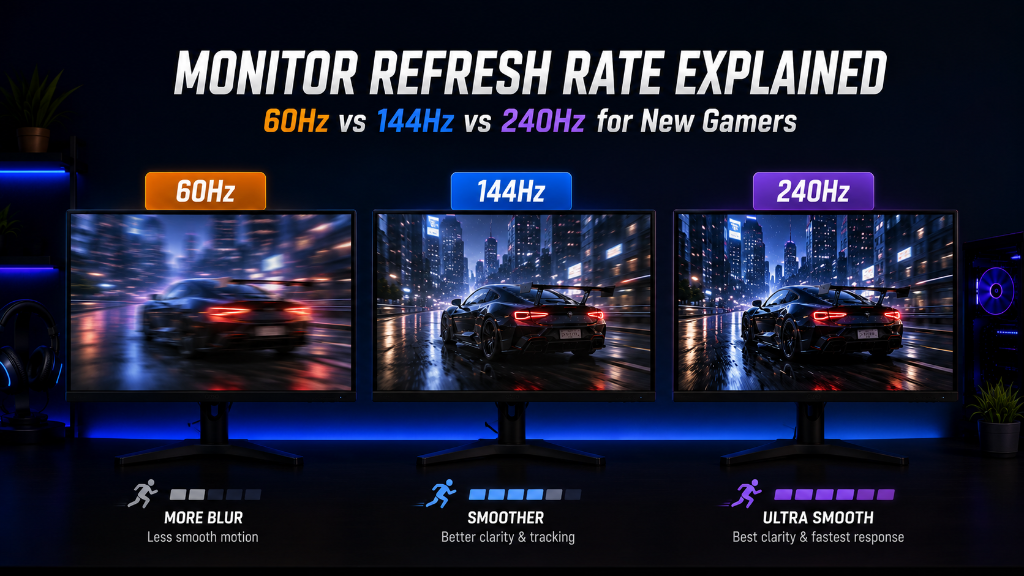
60Hz: The Traditional Standard
A 60Hz monitor refreshes the image 60 times per second.
For many years, this was the standard for gaming and everyday computer use.
The benefits include:
- Lower cost
- Widely available options
- Good experience for casual gaming
The outcome is simple:
60Hz can still provide an enjoyable gaming experience, especially for slower-paced games.
144Hz: The Most Noticeable Upgrade for Many Gamers
For many people, moving from 60Hz to 144Hz is the easiest refresh rate improvement to notice.
The benefits include:
- Smoother motion
- Easier tracking of moving objects
- More responsive feel during gameplay
The outcome is:
Games often feel smoother and more fluid, particularly in fast-moving situations.
240Hz: Specialized Performance
240Hz continues increasing motion smoothness, but the improvement is usually smaller than the jump from 60Hz to 144Hz.
The benefits include:
- Extremely smooth motion
- Greater responsiveness in fast-paced games
The outcome is:
240Hz is most valuable for players who prioritize competitive performance and have hardware capable of producing very high FPS.
A Simple Beginner Decision Rule
Focus on refresh rates you can realistically use.
If your computer cannot consistently produce high frame rates, an extremely high refresh rate monitor may not provide its full benefit.
For many beginners:
- 60Hz is acceptable.
- 144Hz is often the sweet spot.
- 240Hz is usually optional.
Another important expectation:
A higher refresh rate will not automatically make someone better at games.
It improves how gameplay feels, but skill, practice, and enjoyment still matter far more.
The goal is smoother gaming—not chasing numbers.
Start With Your Games and Hardware
Refresh rate is like watching a moving object through a window: the more often the view updates, the smoother the movement appears. But you only benefit if your computer can keep up.
Before choosing a monitor, write down:
- The games you play most often
- Your graphics card model
- Whether you play casually or competitively
- The frame rates your system typically achieves
Then ask yourself:
“How much smoothness will I realistically benefit from?”
That question will help you make a better decision than comparing refresh rate numbers alone.
You do not need the highest refresh rate available to start gaming correctly.
You simply need a monitor that delivers a smooth and enjoyable experience for the games you actually play.
After choosing the right refresh rate for your setup, explore more practical monitor and gaming strategies in our Setup Zone category page.
Leave a Reply