
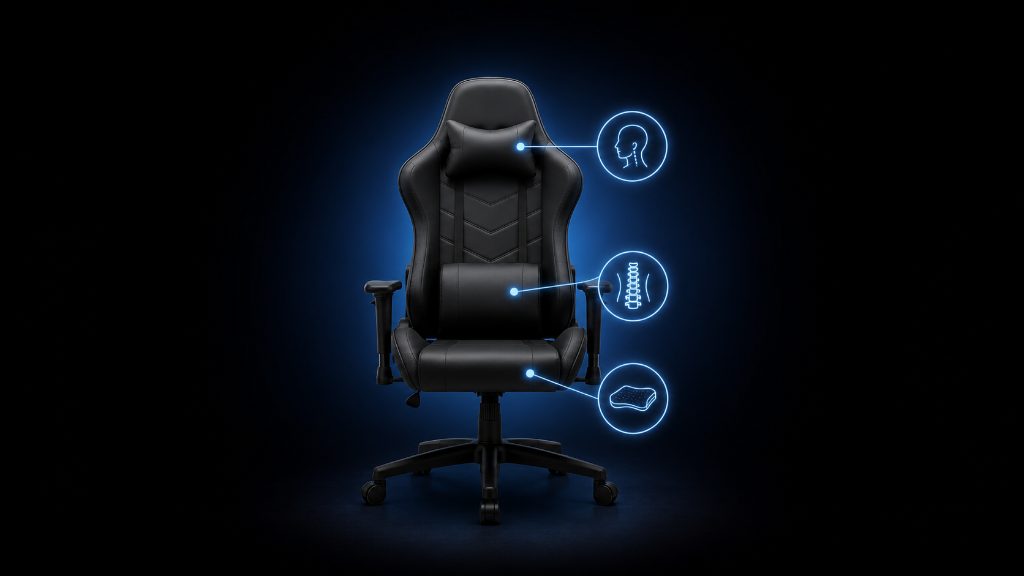
Gaming chairs often come with extra cushions.
You may see a lower back pillow, a neck pillow, or both. They can make the chair look more complete, more comfortable, and more “premium.” For beginners, it is easy to assume these cushions are required.
But are they actually necessary?
The answer depends on your body, your chair, your posture, and the comfort problem you are trying to solve.
Lumbar and neck cushions are not automatically good or bad. They are support tools. When they fit correctly, they can help your back or neck feel more supported. When they do not fit correctly, they can feel awkward, push your body into a strange position, or become another thing you keep adjusting during a gaming session.
That is why beginners should not ask:
Does this chair have extra cushions?
The better question is:
Do these cushions solve a real comfort problem for me?
A cushion should make sitting feel easier. It should not force your posture, distract you, or make the chair feel less natural.
Before buying a chair because it includes pillows, it helps to understand what lumbar and neck support actually do.
Once you know the difference between helpful support and optional accessories, the decision becomes much clearer.
If you’re still learning what makes gaming chairs comfortable, supportive, and useful for longer sessions, our Beginner’s Guide to Gaming Chairs: Comfort, Ergonomics & What Actually Matters walks you through the basics before you decide whether extra cushions actually solve your comfort problem.
The Pillow That Looked Helpful but Felt Wrong
A beginner buys a gaming chair that includes a lumbar pillow and a neck pillow.
At first, it feels like a smart choice.
The chair looks complete. The pillows make it seem more supportive. The product photos show the cushions placed neatly against the backrest. It feels like the chair was designed for long sessions.
But after using the chair, something feels off.
The lumbar pillow keeps sliding. Sometimes it sits too low. Other times it feels too thick and pushes the lower back forward too much. The neck pillow does not line up naturally, so the beginner either ignores it or keeps moving it around.
The chair has support features, but the support does not fit.
Now the beginner wonders if they are sitting wrong.
But the real issue is simpler.
The cushions were treated like automatic upgrades instead of fit-based tools.
Extra cushions only help when they match your body and solve a specific problem. If they do not line up with your lower back or neck, they may become annoying instead of useful.
That is why beginners need a better way to judge support.
The goal is not to use every cushion because it came with the chair.
The goal is to use support only when it makes sitting more comfortable.
Support Should Solve a Real Comfort Problem
Lumbar support is support for your lower back.
Your lower back naturally has a slight curve. When a chair gives no support in that area, you may start slouching or collapsing backward. A lumbar cushion can help fill that gap and remind your body to sit in a more supported position.
But lumbar support should feel natural.
If the cushion is too thick, it may push your back forward. If it is too low, it may press into the wrong area. If it is too high, it may miss the lower back completely. If it moves constantly, it may become distracting.
A lumbar cushion is helpful when your lower back feels unsupported and the cushion fills the gap comfortably.
It is optional when your chair already has good built-in lower back support.
It may be unnecessary if the cushion makes you feel stiff, pushed forward, or uncomfortable.
Neck support works differently.
A neck pillow is usually meant to support your head or neck when you lean back. It can be useful if you recline often, relax between matches, or need gentle support behind the neck area.
But beginners sometimes expect a neck pillow to fix all posture problems.
It does not.
If your screen is too low, your head may still lean forward. If your chair height is wrong, your neck may still feel tense. If the pillow does not line up with your neck, it may push your head into an awkward position.
A neck cushion helps most when it supports a relaxed position.
It is less useful if you mostly sit upright and lean forward toward the screen. It is also less useful if it rests behind the wrong part of your head or neck.
The important idea is this:
Cushions do not replace proper fit.
A chair should still match your body size, seat depth, backrest shape, and desk height. Cushions can improve support, but they should not be used to cover up a chair that does not fit you.
Extra cushions are best when they make a good chair feel more personalized.
They are not a guarantee that the chair is ergonomic.
Beginners should also remember that comfort can change during a session. A cushion that feels fine for five minutes may feel too firm after an hour. That is why testing matters. Sit normally. Adjust one cushion at a time. Notice whether your body feels more relaxed or more restricted.
Helpful support usually feels quiet.
You do not think about it constantly.
It simply helps your back, neck, and shoulders feel less strained.
If the cushion keeps calling attention to itself, it may not be helping.
Do You Actually Need Extra Cushions?
Use this checklist before buying or relying on lumbar and neck cushions.
1. Check your lower back
Ask:
Does my lower back feel unsupported?
Do I start slouching quickly?
Does the chair leave a gap behind my lower back?
Does a lumbar cushion make me feel more supported?
Does the cushion feel natural after sitting for a while?
A lumbar cushion may help if it fills a real support gap without pushing you forward too much.
2. Check the lumbar cushion fit
Ask:
Can I place the cushion at the right height?
Does it stay in position?
Is it too thick?
Is it too firm?
Does it support my lower back instead of my middle back?
If the cushion cannot sit where your body needs it, it may not be useful.
3. Check your neck position
Ask:
Does my neck feel tired during gaming?
Do I lean my head forward toward the screen?
Do I recline often?
Does the neck pillow support me when I relax?
Does it push my head forward awkwardly?
A neck pillow helps most when it supports a relaxed leaning position, not when it forces your head forward.
4. Check whether the chair already supports you
Ask:
Does the backrest already support my lower back?
Does the chair shape feel comfortable without extra cushions?
Does removing the cushion feel better?
Does the chair fit my body naturally?
Am I using the cushion because I need it or because it came with the chair?
If the chair already feels good, extra cushions may be optional.
5. Check your setup before blaming the cushion
Ask:
Is my screen too low?
Is my desk too high?
Is my chair height wrong?
Are my shoulders tense because of the armrest position?
Am I leaning forward because the screen is too far away?
Sometimes neck or back discomfort comes from setup alignment, not missing cushions.
6. Watch for warning signs
Be careful if:
The lumbar pillow keeps sliding.
The neck pillow does not line up with your body.
The cushion makes you feel stiff.
The cushion pushes you forward.
You keep adjusting it during gaming.
The chair feels better without it.
A cushion should reduce friction, not create another problem.
7. Make the final decision
Use a lumbar cushion if:
Your lower back feels unsupported.
The cushion fits the curve of your lower back.
It stays in place.
It makes sitting feel easier.
Use a neck cushion if:
You recline often.
It supports your neck naturally.
It does not push your head forward.
It helps you relax between sessions.
Skip extra cushions if:
Your chair already supports you well.
The cushions feel awkward.
They do not fit your body.
They distract you during play.
They are included only as decoration.
The right choice is the one that improves comfort without forcing your posture.
Treat Cushions Like Tools, Not Requirements
Lumbar and neck cushions are like optional controller grips. They can help when they fit your hands, but they are not required for everyone.
These chair elements can be helpful, but they are not magic.
They do not automatically make a gaming chair better. They do not guarantee good posture. They do not fix every comfort problem.
They are tools.
A lumbar cushion should help your lower back feel supported.
A neck cushion should help your head or neck feel relaxed when the position makes sense.
If they do that, they can be useful.
If they do not, they are optional.
Before choosing a chair because it includes extra pillows, ask what those pillows actually solve. Do they fit your body? Do they stay in place? Do they make the chair more comfortable? Or do they only make the chair look more complete?
The best gaming setup is not the one with the most accessories.
It is the one that feels right during real use.
Start with chair fit.
Check your posture.
Look at your desk and screen alignment.
Then decide whether extra cushions solve a real problem.
Once you separate helpful support from optional accessories, the choice becomes much easier.
You are no longer asking, “Do beginners need extra cushions?”
You are asking, “Does this support actually help my situation?”
After understanding when lumbar and neck cushions are helpful or optional, try more setup strategies in our Setup Zone category page.
Leave a Reply