
Buying a chair for gaming can feel more confusing than it should.
You may see gaming chairs with bright colors, racing-style seats, big pillows, adjustable armrests, reclining backs, and bold designs. Then you may look at a regular office chair and wonder if it does the same job without looking like gaming gear.
For beginners, the question is simple:
Do you actually need a gaming chair, or is a regular chair good enough?
The answer depends on your body, your setup, your budget, and how long you usually play.
A gaming chair is not automatically better just because it says “gaming.” A regular chair is not automatically worse just because it looks plain. The real difference is how each chair supports your posture, comfort, movement, and gaming habits over time.
The goal is not to buy the coolest-looking chair.
The goal is to choose the chair that helps you sit comfortably, reach your controls easily, and enjoy gaming without feeling stiff, distracted, or uncomfortable.
If you are still building your setup, this decision matters because your chair affects more than how your room looks. It affects how your back feels, how your arms rest, how close you sit to your desk or screen, and how long you can play before needing a break.
So before you spend money, it helps to separate the real differences from the marketing.
If you’re still learning what makes gaming chairs comfortable, supportive, and useful for gaming, our Beginner’s Guide to Gaming Chairs: Comfort, Ergonomics & What Actually Matters walks you through the basics before you decide whether a gaming chair or regular chair fits your setup.
The Chair That Looked Better Than It Felt
A beginner gamer sees a racing-style gaming chair online.
It looks amazing.
The chair has sharp colors, a tall backrest, a head pillow, a lumbar cushion, and armrests. It looks like the kind of chair a serious gamer should own. So the beginner buys it, builds it, and feels excited to complete the setup.
At first, everything feels great.
The setup looks more “official.” The chair matches the gaming desk. The room feels upgraded.
But after a few longer sessions, problems start showing up.
The seat feels too narrow. The side bolsters press into the legs. The lumbar pillow keeps sliding out of place. The armrests do not line up well with the desk. The chair looks good, but it does not feel right.
Then the beginner tries a simple office chair at someone else’s house and notices something surprising.
It does not look like a gaming chair, but it feels more comfortable.
That is when the real lesson appears:
A chair is not better because of its label.
A chair is better when it fits your body, your setup, and your gaming habits.
This is why beginners should not compare gaming chairs and regular chairs only by appearance. They should compare what the chair actually does.
What Really Separates a Gaming Chair From a Regular Chair?
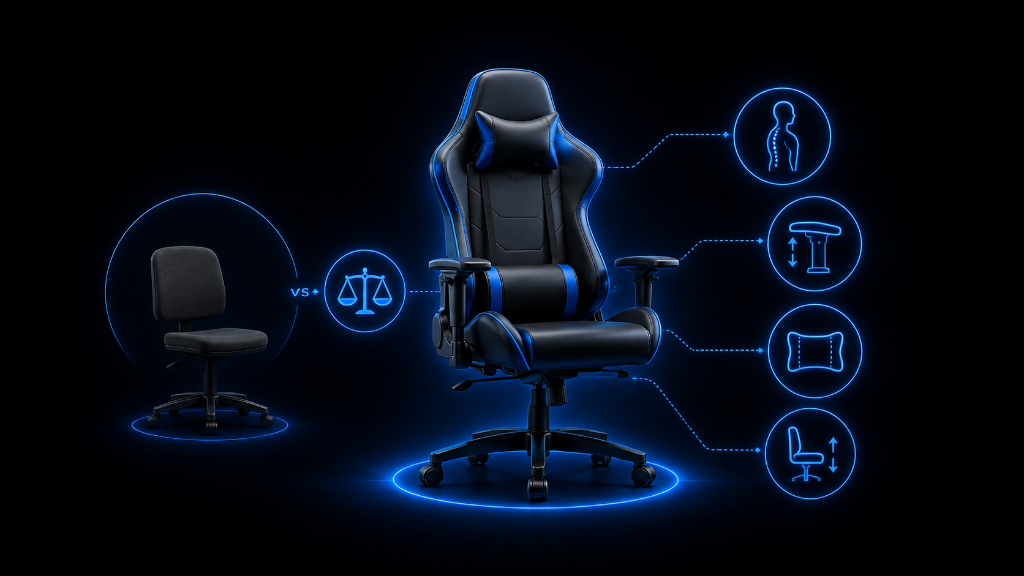
A gaming chair is usually designed with a more aggressive style. Many gaming chairs use racing-style shapes, tall backrests, side bolsters, head pillows, lumbar cushions, reclining features, and adjustable armrests.
These features can be helpful, but they are not always necessary.
A regular chair, especially a good office chair, usually focuses more on everyday sitting comfort. It may have a simpler design, more breathable materials, better seat flexibility, and a shape that works for many body types.
The real difference is not “gaming vs regular.”
The real difference is style-focused support vs everyday ergonomic support.
A gaming chair may be a good fit if you like a tall backrest, want a chair that matches your gaming setup, enjoy reclining, and prefer a more enclosed seat feeling. Some gaming chairs also offer useful adjustments that help with long sessions.
But a regular chair may be a better fit if you want simple comfort, better airflow, less pressure on your legs, and a chair that works for gaming, studying, work, and everyday computer use.
The mistake beginners make is thinking a gaming chair automatically improves gaming.
It does not improve your aim. It does not make you a better player. It does not magically fix posture by itself.
What it can do is support your body better if the chair fits you correctly.
The same is true for a regular chair.
A regular chair can be excellent for gaming if it supports your back, lets your feet rest flat, keeps your arms comfortable, and works with your desk or screen height.
That means the best chair is not always the one with the gaming label.
The best chair is the one that helps you stay comfortable and focused.
Here are the main areas to compare.
Comfort
Ask yourself how the chair feels after more than a few minutes. A chair can feel fine at first but become uncomfortable during longer sessions.
Gaming chairs may feel firm and supportive, but some can feel narrow or stiff. Regular chairs may feel softer or more flexible, but some may lack strong back support.
Support
A good chair should support your back without forcing your body into an awkward position.
Gaming chairs often include lumbar and neck pillows. These can help some people, but they may not fit everyone. Regular ergonomic chairs may have built-in lower back support that feels more natural.
Adjustability
Adjustability matters because your chair has to fit your body and setup.
Helpful adjustments include seat height, armrest height, backrest angle, tilt, and lumbar support. A gaming chair with more adjustments can be useful, but only if those adjustments actually help you sit better.
Fit
Chair size matters.
If the seat is too small, too deep, too high, or too narrow, the chair may feel uncomfortable even if it has good features. This is especially important with racing-style gaming chairs because the side bolsters may not fit everyone comfortably.
Setup Compatibility
Your chair should work with your desk, monitor, keyboard, mouse, controller, or TV setup.
If the chair sits too low, too high, or too far back, your posture may suffer. A regular chair that fits your desk may be better than a gaming chair that looks better but places your arms or screen at the wrong height.
Budget
Gaming chairs often cost more because of branding, style, and extra features. Some are worth it, but some are mostly selling the gaming look.
A regular chair may give better comfort for the same price, especially if it is designed for long sitting sessions.
The smart move is to pay for support, fit, and adjustability before paying for style.
Choose the Chair That Fits Your Situation
Use this checklist before deciding between a gaming chair and a regular chair.
Choose a gaming chair if:
You like the gaming look and want your chair to match your setup.
You prefer a tall backrest and a more enclosed sitting feel.
You want features like reclining, pillows, and adjustable armrests.
You have checked the chair size and know it fits your body.
You are comfortable with a firmer seat.
You play for longer sessions and the chair gives you real support, not just style.
You are paying for useful features, not only the design.
Choose a regular chair if:
You want simple comfort more than gaming style.
You need a chair for gaming, work, studying, or everyday computer use.
You want better airflow from fabric or mesh.
You prefer a less restrictive seat shape.
You want a chair that blends into your room.
You are trying to get the best comfort for your budget.
You do not need racing-style design, pillows, or flashy features.
Be careful with either chair if:
The seat does not fit your body.
The armrests do not line up with your desk.
The chair has poor reviews about comfort or durability.
The chair looks good but does not explain its support features.
You cannot adjust the height properly.
You are buying only because it looks like a “real gaming setup.”
The best beginner choice is the chair that answers these questions clearly:
Does it fit my body?
Does it fit my desk or screen setup?
Can I sit in it comfortably for my normal gaming sessions?
Does it support my back and arms?
Is the price fair for the comfort and features?
Do I actually need the gaming design, or do I just need a better chair?
If the chair helps you sit comfortably, play without distraction, and avoid unnecessary strain, it is doing the right job.
Pick the Chair by Function, Not the Label
Choosing between a gaming chair and a regular chair is like choosing the right controller. The best one is not always the flashiest one. It is the one that feels right in your hands and helps you play comfortably.
Your chair works the same way.
A gaming chair can be a good choice if it fits your body, supports your posture, and gives you features you will actually use.
A regular chair can also be a great gaming chair if it is comfortable, adjustable, and works well with your setup.
Do not let the label make the decision for you.
Start with comfort.
Check the fit.
Look at the support.
Compare the adjustments.
Respect your budget.
Then choose the chair that matches how you actually play.
Once you understand the real difference between a gaming chair and a regular chair, the decision becomes much easier.
You are not trying to buy the chair that looks the most like gaming.
You are trying to buy the chair that helps you keep gaming comfortably.
After understanding the real difference between gaming chairs and regular chairs, try more setup strategies in our Setup Zone category page.
Leave a Reply